Data source
For drop-down lists, drop-down check boxes, radio buttons, check boxes, etc., they require a selection list. The data source used to provide a list of choices is called a data source. There are generally several methods for setting up a data source.
1.value child node
Such as:
<?xml version='1.0' encoding='utf-8'?>

<attribute name="sex" descriptors="xworker.lang.MetaDescriptor3/@attribute" inputtype="select">
     <value name="male" value="male"/>
     <value name="female" value="female"/>
</attribute>
2. Override the List<Thing> getValues() method
For example:
<?xml version='1.0' encoding='utf-8'?>

<attribute name="job" descriptors="xworker.lang.MetaDescriptor3/@attribute" inputtype="select">
     <actions>
         <GroovyAction name="getValues" descriptors="xworker.groovy.GroovyAction">
             <code><![CDATA[import org.xmeta.Thing;

def values = [];

def male = new Thing();
male.put("name", "Male");
male.put("value", "male");
values.add(male);

def female = new Thing();
female.put("name", "Female");
female.put("value", "female");
values.add(female);

return values;]]></code>
         </GroovyAction>
     </actions>
</attribute>
3. Data object
The data object is a two-dimensional tabular data framework and a bridge between storage and interface. CURD operations on data can be implemented through data objects, which can also be easily mapped to the interface.
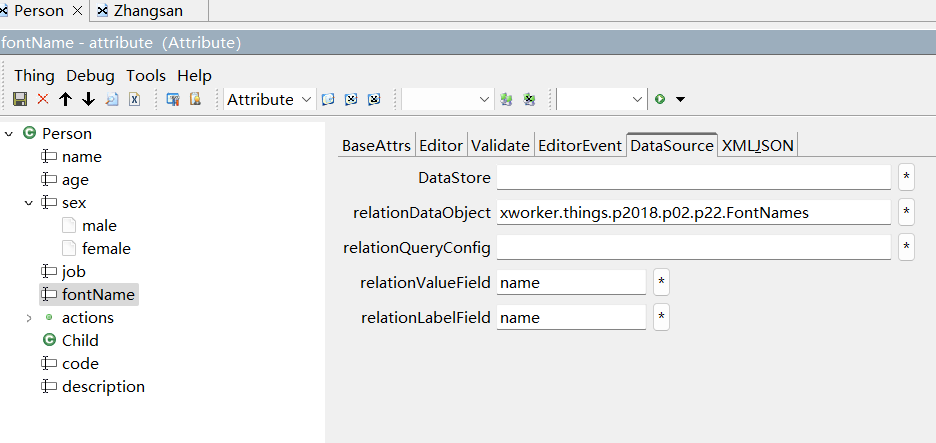
3.1. Set the data object as the data source
Such as:
<?xml version='1.0' encoding='utf-8'?>

<attribute name="fontName" descriptors="xworker.lang.MetaDescriptor3/@attribute" inputtype="select"
      relationDataObject="xworker.things.p2018.p02.p22.FontNames" relationValueField="name"
      relationLabelField="name"/>
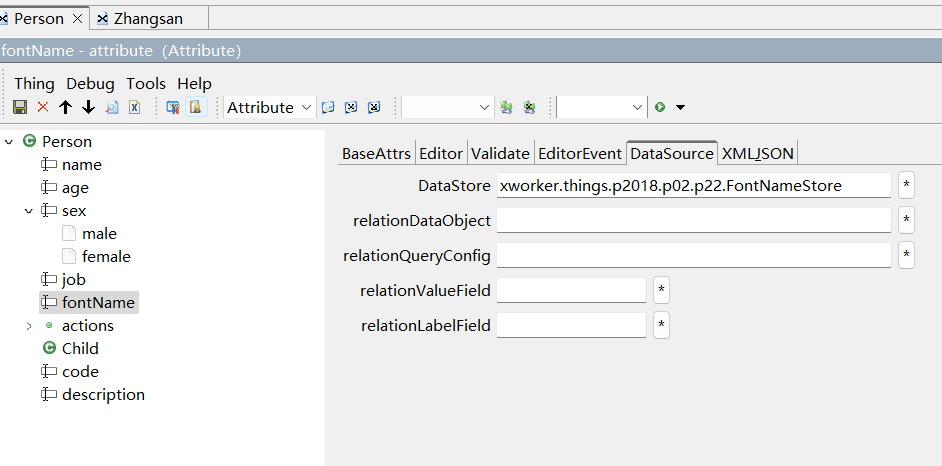
3.2. Set the data warehouse as the data source
Such as:
<?xml version='1.0' encoding='utf-8'?>

<attribute name="fontName" descriptors="xworker.lang.MetaDescriptor3/@attribute" inputtype="select"
      dataStore="xworker.things.p2018.p02.p22.FontNameStore"/>
Copyright © 2007-2019 XWorker.org 版权所有 沪ICP备08000575号
